Online ordering

Online ordering that earns more than it costs

Guests order in a few steps on your own branded website, and the order arrives in your ORSYS POS. For our partners, toppings, the system usage fee and cart offers alone bring in 2–3 times the monthly fee on average.

  • Ordering without registration
  • Delivery or pickup
  • Scheduled orders
  • Extra toppings with surcharges
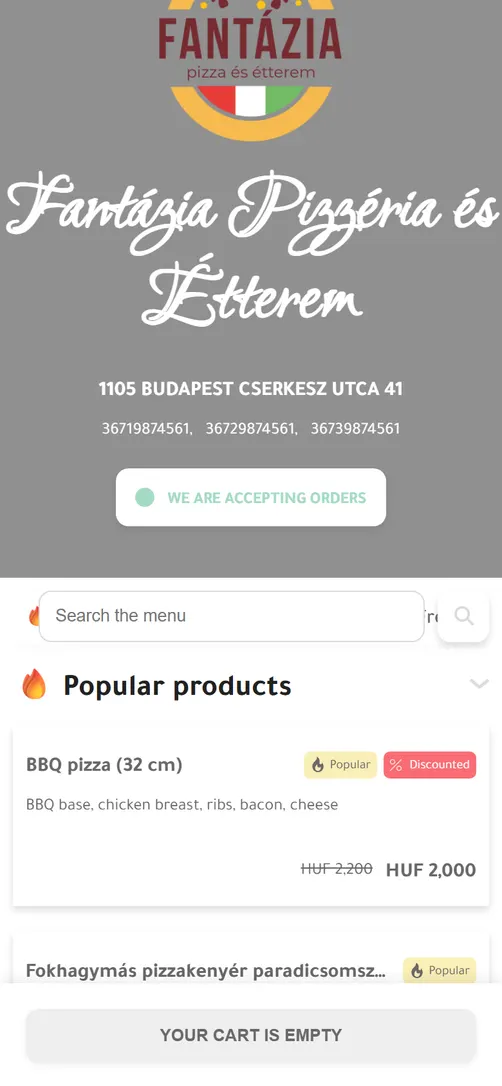
The demo restaurant's menu on a phone, with popular products
Example: the demo restaurant's interface
How guests order

Six steps from menu to finished order

  1. Choose a dish

    They browse or search the menu and see popular products right at the top.

  2. Make it their own

    They pick toppings and see the total, surcharges included, straight away.

  3. Decide how and when

    “Delivery” or “Pick up”, and “Now” or “Later”.

  4. Enter their details

    With a profile or “Without profile”: name, phone number and email address, plus the address for delivery.

  5. Choose how to pay

    They pick one of the payment methods you allow and place the order.

  6. Follow the order

    They receive a confirmation email and see on the order page how their order is progressing.

In detail

What your guests see, and what you control

Example: the demo restaurant's interface

Ordering without registration

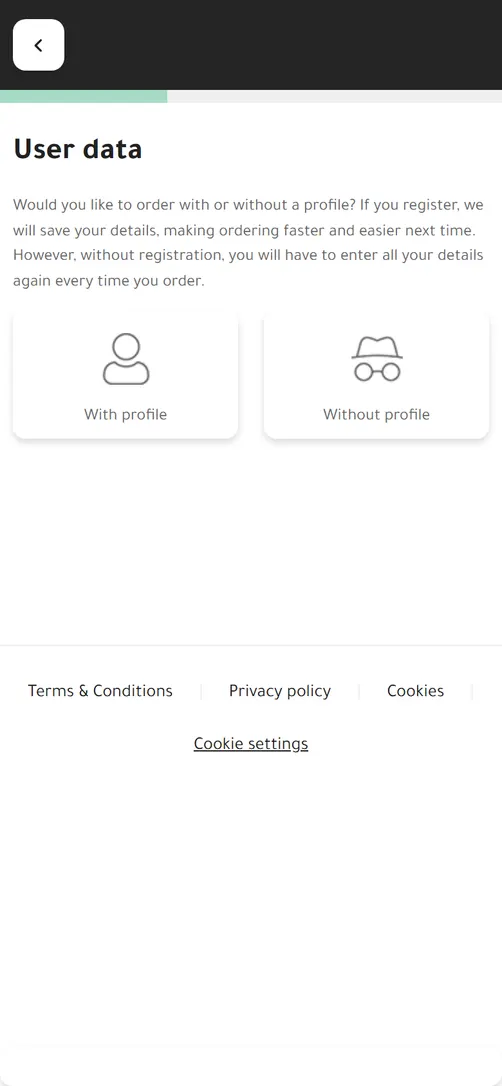
Guests choose whether to order with a profile or “Without profile”. Without a profile they only enter their name, phone number and email address, plus their address for delivery. A sign-up form never stands between them and their first order.

After ordering, they can still create an account by choosing a password, so next time they don't have to type their details again.

You decide

  • Allow ordering without a profile, or require an account for every order.
User data: order with or without a profile

Delivery and pickup

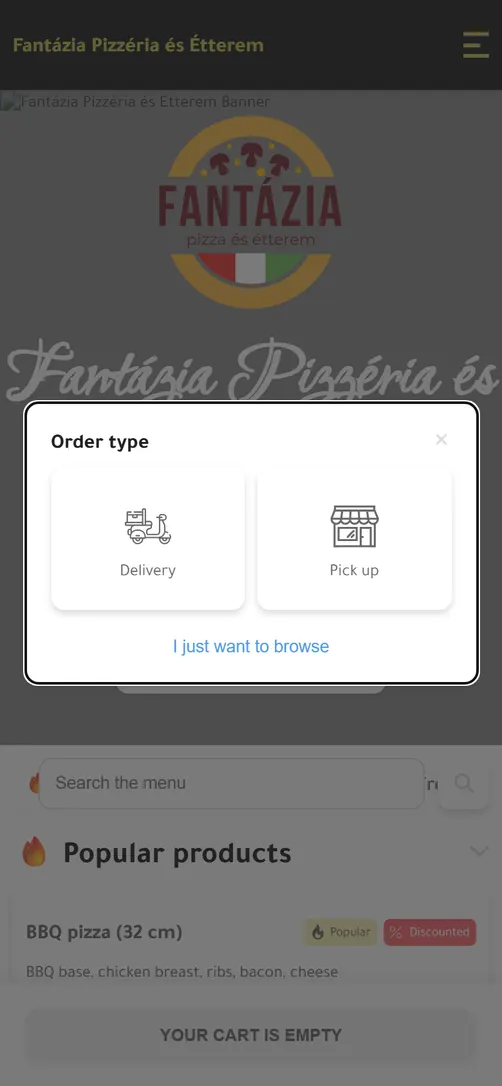
Guests choose “Delivery” or “Pick up”. For delivery they enter their address, and the system checks that it falls within your delivery zone.

For each zone you set the minimum order value, the delivery fee and the order value above which delivery is free. If the cart is below the minimum, guests see how much is missing. Pickup needs no address and has no delivery fee.

You decide

  • Offer delivery, pickup or both.
  • Ask guests to choose the order type as soon as they open the menu.
Order type: Delivery or Pick up

Scheduled orders

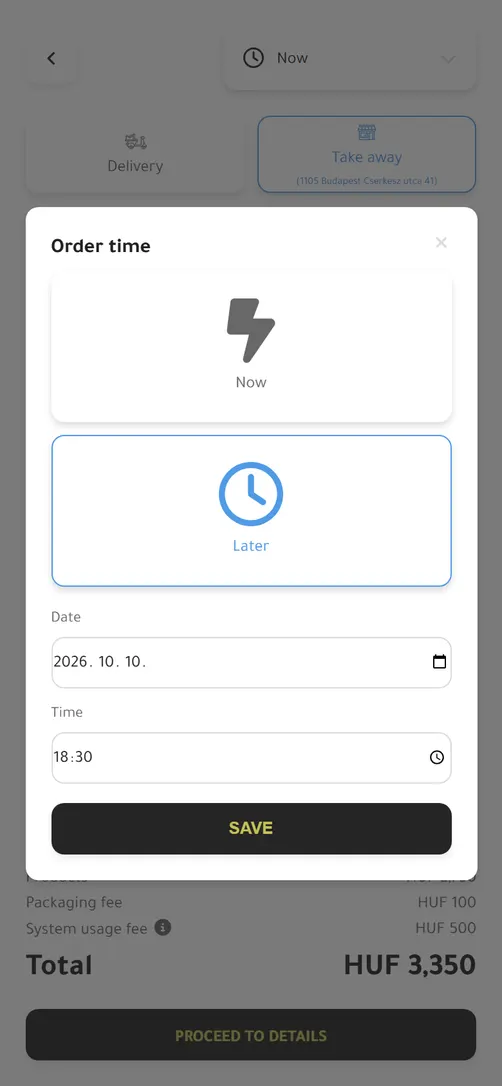
Guests order “Now” or “Later”. For a later time they choose to the quarter hour, up to the day you allow. The system only accepts times when you are open.

Scheduled orders wait in a separate group in your POS, and you send them to the kitchen when it's time.

You decide

  • Enable it separately for delivery and pickup.
  • Set how far ahead guests can order: same day, a few days or up to two months.
  • Accept scheduled orders even while you are closed.
Order time: Now or Later, with date and time

Extra toppings

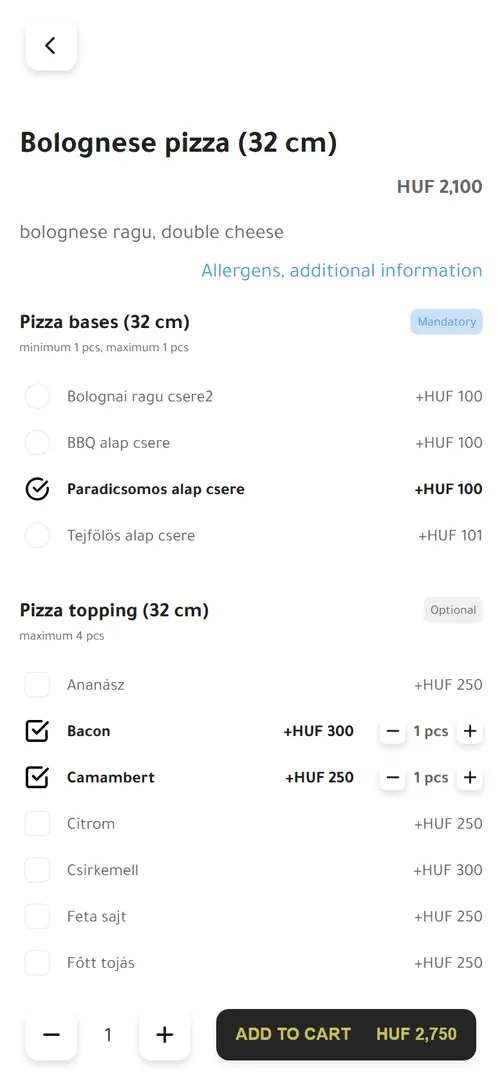
You set up topping groups for your products. A group can be mandatory, such as the pizza base or the size, or optional, such as extra cheese. You set the minimum and maximum number of toppings guests can choose from it, and the surcharge for each.

Guests see the total while they choose. A product can't go into the cart until its mandatory toppings are chosen, so the kitchen gets complete orders. In the “Special request” field guests can also leave a note for the kitchen.

You decide

  • Turn on topping selection and per-item notes.
  • Set the toppings, surcharges and allowed quantities for each group.
Product with toppings: a mandatory pizza base and optional toppings with surcharges

Order status

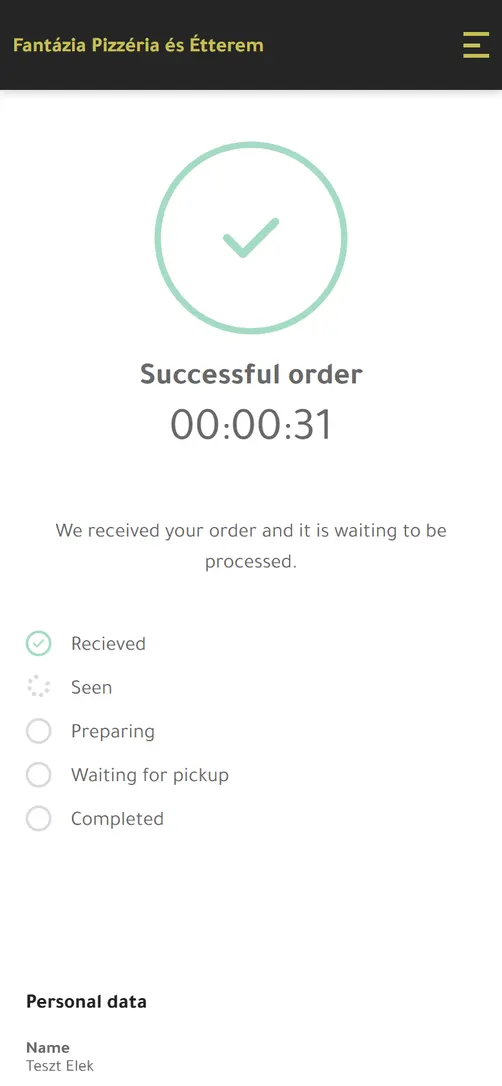
After ordering, guests follow their order on the order page as it is received, seen, prepared, then out for delivery or ready for pickup, and finally completed. They also receive a confirmation email for the successful order.

The status changes with the actions taken in your POS, so guests don't need to call and ask. They can follow the order in the browser they ordered from, or in their account.

You decide

  • Turn on automatic refreshing of the order page.
Successful order: the order status step by step
Your side

How the order reaches you

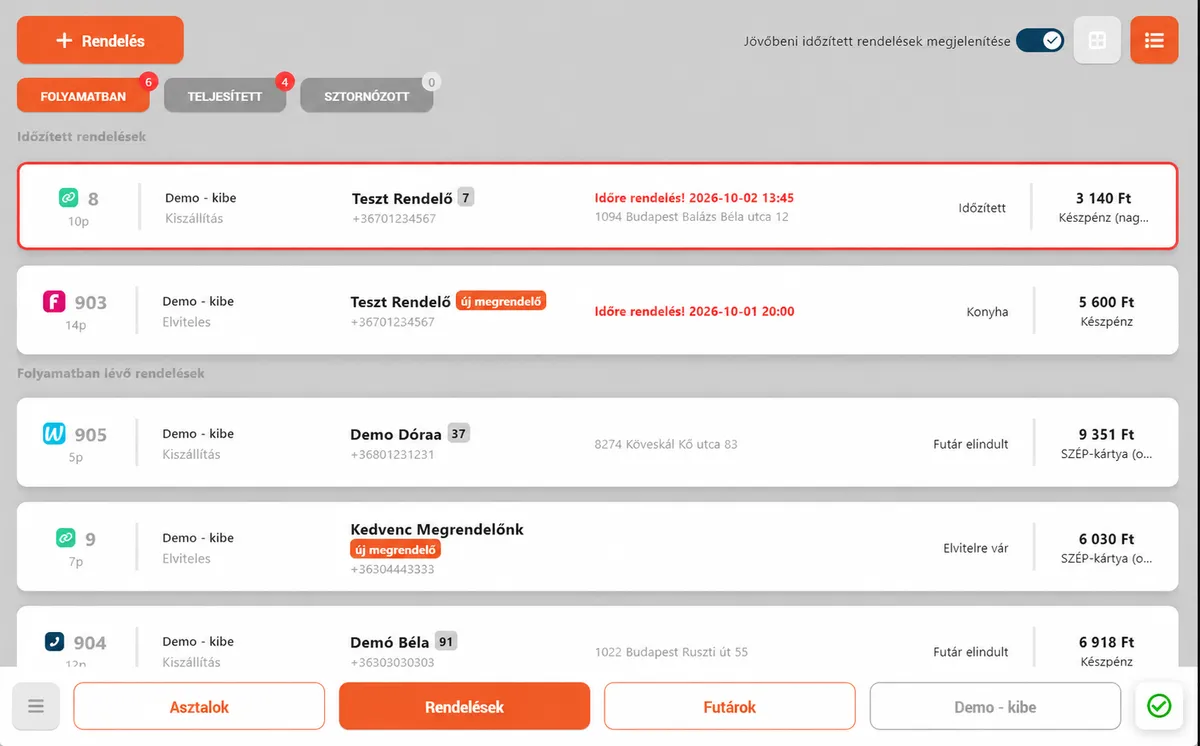
Orders placed on your website arrive in your ORSYS POS, in the same list where you handle phone, Wolt and Foodora orders. There's no separate screen to watch.

Orders in the ORSYS POS: website, phone, Wolt and Foodora orders, including scheduled orders

Never missed

While an order is waiting to be accepted, the POS plays a sound every 30 seconds and shows a notification. Orders can also be accepted automatically.

One list for every channel

An icon shows where each order came from: your website, the phone, Wolt or Foodora. Scheduled orders wait in their own group.

Complete kitchen tickets

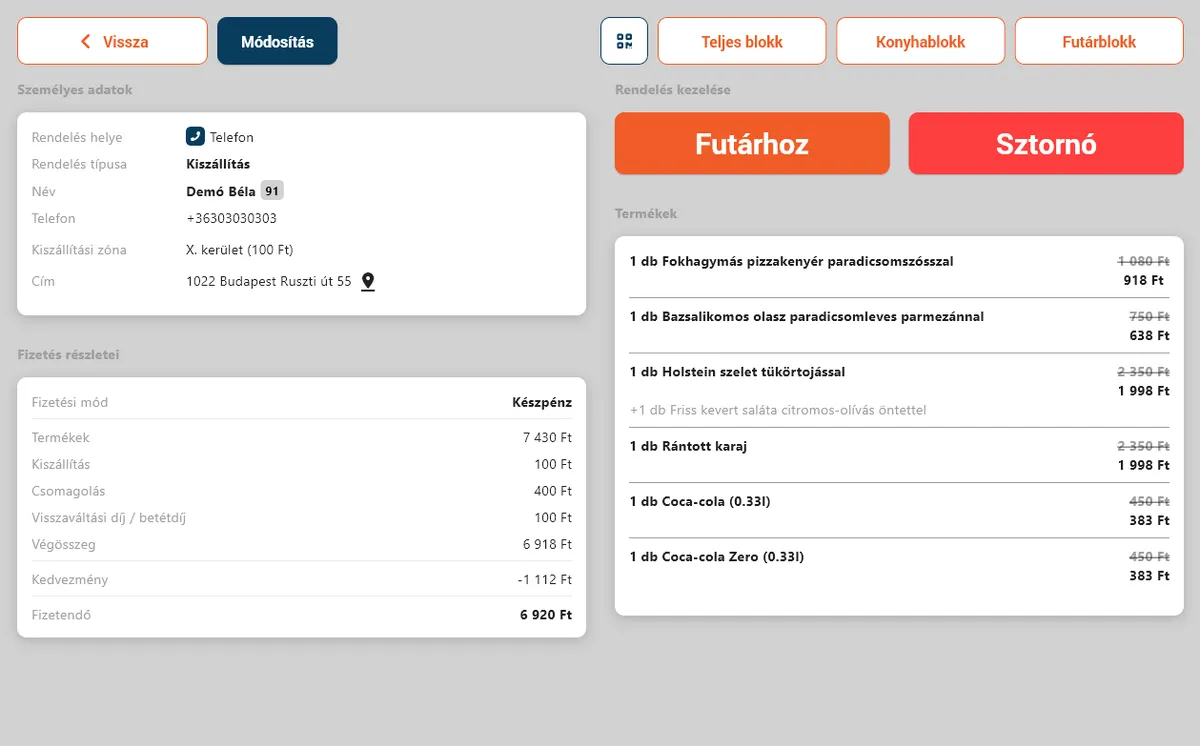
Kitchen tickets list the toppings and item notes, courier tickets the address, phone number and payment method. Printing can be automatic.

Quick hand-off to couriers

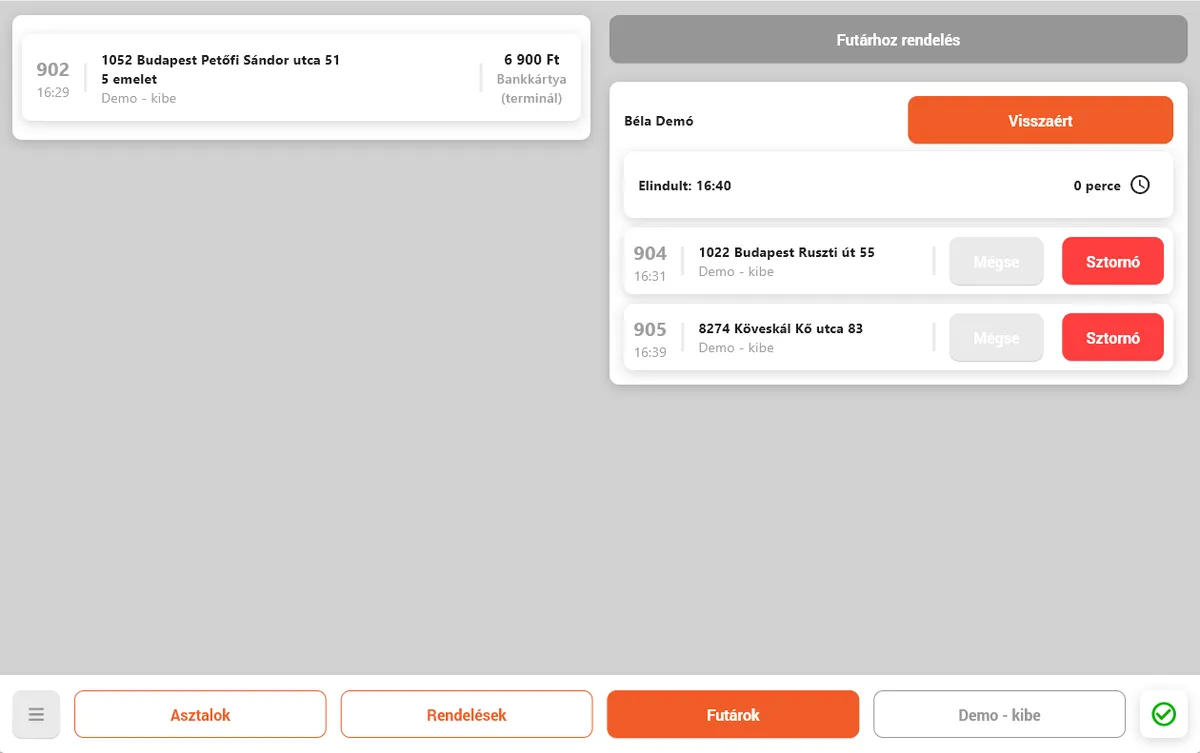
Assign several orders to one courier and record when they leave and return. The guest's status page follows along.

Know your guests

See who is ordering for the first time, who keeps coming back, and whom you have blacklisted.

Order details: customer data, products with toppings, kitchen and courier ticket printing
Courier management: assigning orders to a courier, departure and return

The ORSYS POS interface in Hungarian, with demo data

Extra revenue

The extras alone cover the monthly fee

Based on our partners' data, the restaurant website's monthly fee pays for itself 2–3 times over on average from extra revenue alone: toppings, the system usage fee and cart offers. On top of that comes the full value of every order, with no commission taken out.

Average return

2–3× the monthly fee

Toppings with surcharges

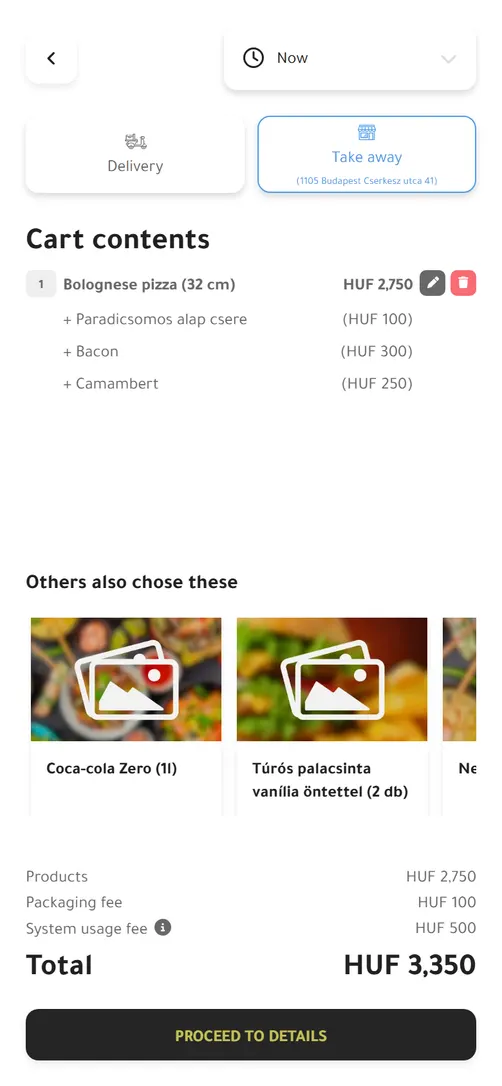
An extra topping is a small amount per order, but over a month it adds up to real extra revenue. In the picture, a HUF 2,100 pizza became HUF 2,750 with toppings.

System usage fee

You can set a fixed system usage fee that guests pay as part of the order total. You decide whether to charge one, and how much.

Cart offers

In the cart, the “Others also chose these” row suggests drinks, desserts or sides, so the same order ends up with a bigger basket.

The return is an average across several partners. Actual results depend on order volume, menu and settings.

Cart with toppings, cart offers, packaging fee and system usage fee

You pay no commission on orders from your website, and the monthly fee follows your order volume. Guests can also pay online by bank card and SZÉP card. See pricing

Demo

Request a demo and let's see how this would work for you

If you'd like to see what your own restaurant website could look like, please fill out the form. We'll walk through your volume, your goals and the best-fit plan for you.

  • We'll call you back and discuss the options
  • We'll help you pick the right plan
  • Submitting the form is non-binding

Leave your details and we'll show you how to build your own commission-free ordering channel.

V&T Global Szolgáltató Kft. uses your details to arrange the requested demo and recognise previous enquiries. This does not subscribe you to a newsletter.

Privacy notice (in Hungarian)

FAQ

Questions about online ordering

Do guests have to register to order?

No, if you allow ordering without a profile. Guests then only enter their name, phone number and email address, plus their address for delivery. If they want, they can create an account with a password after ordering.

How do delivery and pickup work?

Guests choose between them when ordering. For delivery, the system checks the delivery zone based on their address, and the minimum order value and delivery fee set for that zone apply. Pickup needs no address and has no delivery fee.

Can guests order for later, even while we are closed?

Yes, if you turn it on. You can enable it separately for delivery and pickup and set how far ahead guests can order. You can also allow scheduled orders while you are closed. The system only accepts times when you are open.

Can I make a topping choice mandatory, for example the size?

Yes. A topping group can be mandatory or optional, and you set the minimum and maximum number of toppings guests can choose from it. A product can't go into the cart until its mandatory toppings are chosen.

How do guests know where their order is?

They receive a confirmation email for the successful order and can follow its status on the order page. They reach it from the browser they ordered from, or from their account.

How do I find out about a new order?

The order arrives in your ORSYS POS. While it is waiting to be accepted, the POS plays a sound every 30 seconds and shows a notification. If you prefer, orders can also be accepted automatically.

What goes on the kitchen ticket?

The products with the chosen toppings and the guest's item notes. The courier ticket also shows the guest's name, phone number and address, the payment method and the total. Tickets can be printed automatically.

Does online ordering really bring extra revenue?

Based on our partners' data, the restaurant website's monthly fee pays for itself 2–3 times over on average from toppings, the system usage fee and cart offers alone. And you pay no commission on orders from your website.

Who sets up the ordering features?

We do the first upload free of charge on request: the menu, the toppings and the ordering settings. After that you manage them in ORSYS, or we can upload later changes for you for an extra fee.
See live how guests would order from you

In the demo we walk through both the guest and the restaurant side, and look at how much extra revenue your own website could bring.

Request a demo